

Every week, our warehouse in Shenzhen ships hundreds of surveillance-grade HDDs 1 to integrators across the Middle East, Southeast Asia, and beyond. One question keeps coming up from procurement managers: “Is the MQ01ABD100V actually a good deal for my DVR project 2, or am I wasting money?” It is a fair question. The price tag looks attractive, but the real cost of a drive goes far beyond the unit price on an invoice annual workload rating 3. Hidden compatibility issues, premature failures, and capacity shortfalls can turn a budget-friendly purchase into a costly mistake.
To compare the MQ01ABD100V 1TB HDD value against competitors, evaluate five key factors: per-GB cost, 24/7 workload rating, form factor compatibility, firmware optimization for surveillance, and total cost of ownership across your project’s camera count and retention requirements.
Let’s break this down section by section. Below, we will walk through reliability, cost-effectiveness, authenticity verification, and technical advantages so you can make a sourcing decision with full confidence.
From our experience shipping drives to surveillance integrators in Dubai and Riyadh, reliability complaints almost always trace back to one root cause: using a consumer-grade drive in a 24/7 duty cycle 4. The MQ01ABD100V is built for laptops, not for continuous recording. Many buyers overlook this because the spec sheet looks decent on paper MTBF hours 5.
Compare reliability by checking the annual workload rating, MTBF hours, and whether the drive firmware supports continuous sequential writes. The WD Purple rates 180 TB/year workload and 1,000,000 hours MTBF; the MQ01ABD100V lacks a published surveillance workload rating, making it unsuitable for 24/7 DVR/NVR duty.
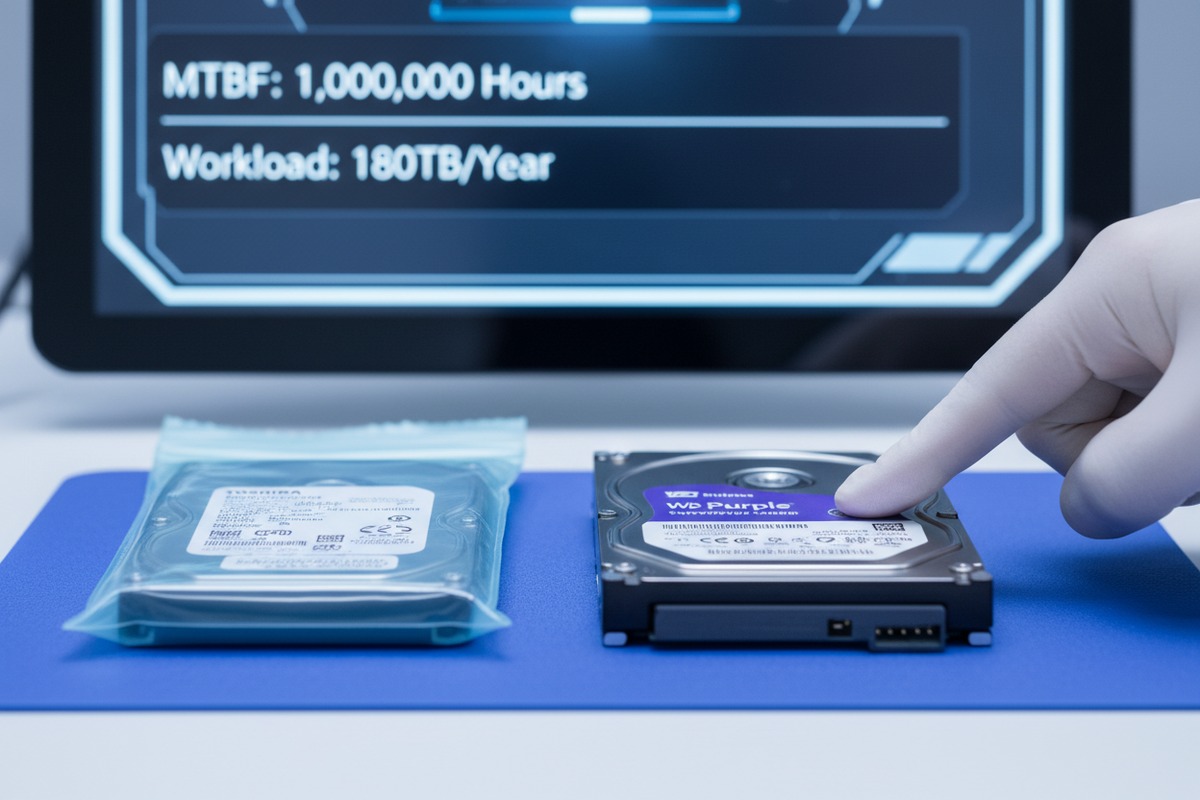
A surveillance drive must write data continuously. Unlike a desktop drive that reads and writes in bursts, a DVR or NVR writes video streams from multiple cameras nonstop. This places enormous stress on the drive head, platters, and firmware. Drives not built for this workload develop bad sectors faster, overheat, and fail sooner.
The MQ01ABD100V is a 5400 RPM, 2.5-inch drive with a SATA 3Gb/s interface. It was designed for portable devices. It handles vibration well for a laptop bouncing around in a backpack. But it was never engineered for the thermal envelope inside a DVR chassis running 24 hours a day, 7 days a week.
| Specification | MQ01ABD100V | WD Purple (WD43PURZ) | Seagate SkyHawk (ST4000VX016) |
|---|---|---|---|
| Form Factor | 2.5-inch | 3.5-inch | 3.5-inch |
| Capacity | 1 TB | 4 TB | 4 TB |
| Spindle Speed | 5400 RPM | 5400 RPM | 5400 RPM |
| SATA Interface | 3 Gb/s | 6 Gb/s | 6 Gb/s |
| Workload Rating | Not specified | 180 TB/year | 180 TB/year |
| MTBF | Not specified | 1,000,000 hours | 1,000,000 hours |
| 24/7 Operation Design | No | Yes | Yes |
| RV Sensors | No | No (single-drive) | Yes |
| Surveillance Firmware | No | AllFrame 4K | ImagePerfect |
WD Purple uses AllFrame 4K technology 6. This firmware reduces frame loss by managing the write cache to prioritize video streams. Seagate SkyHawk uses ImagePerfect firmware 7 to support up to 64 HD cameras without dropping frames. The MQ01ABD100V uses standard consumer firmware. In a multi-camera DVR setup, this can lead to stuttering playback, dropped frames, and corrupted recordings — exactly the footage you need when an incident occurs.
Our engineers have tested 2.5-inch consumer drives inside compact NVR enclosures. They consistently run 5–8°C hotter than 3.5-inch surveillance drives in the same ambient conditions. The smaller form factor traps heat. Over months of continuous operation, this heat accelerates wear on internal components. If you are deploying in the Middle East or Southeast Asia where ambient temperatures are already high, this becomes a critical factor.
The bottom line is simple: the MQ01ABD100V can store video. But it was never built to do so around the clock, month after month. For any project with more than a single camera or a retention period beyond a few days, a purpose-built surveillance drive is the safer investment.
Our quality control team inspects every batch before it leaves our Shenzhen warehouse. We know exactly what original packaging looks like — and we know every trick used to pass off refurbished or pulled drives as new. The risk is real. In the Shenzhen and Hong Kong markets, mixed-quality stock circulates freely, and without proper verification, even experienced buyers get burned.
Verify authenticity by cross-checking the outer box label, drive body label, and drive serial number barcode for consistency, then validate the serial number on the manufacturer’s official website, inspect the drive body for physical wear, and run read/write diagnostic tests to confirm operational health.
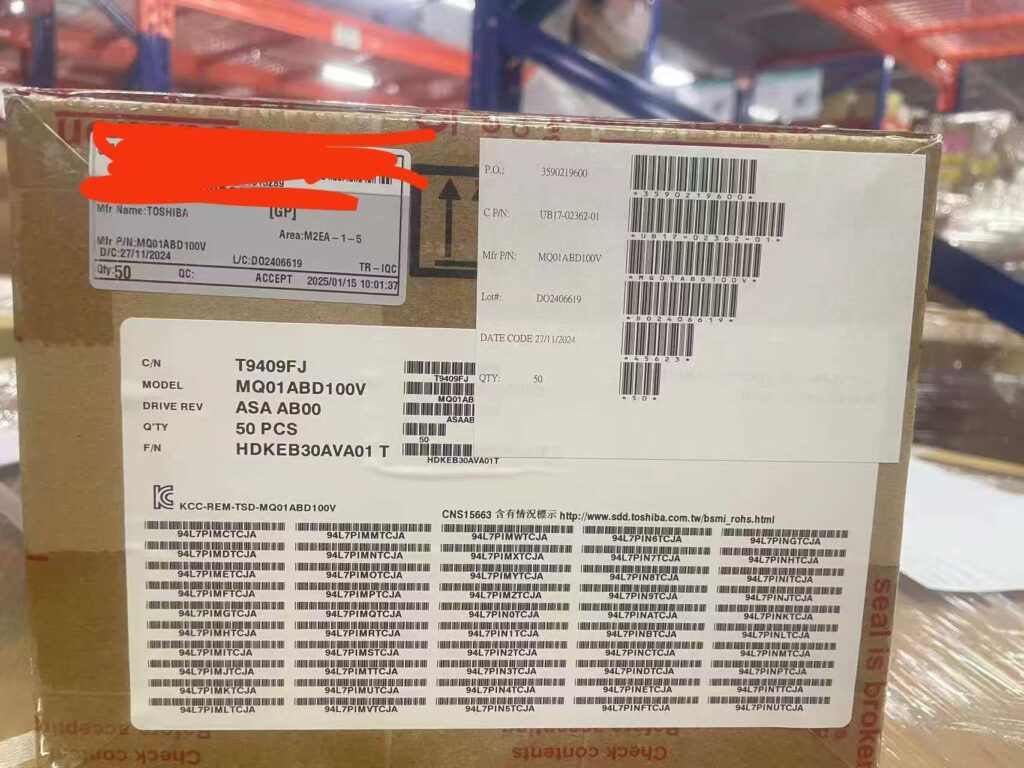
Original MQ01ABD100V drives ship in anti-static bags, often inside individual boxes or bulk cartons sealed with manufacturer security tape. Look at the outer carton carefully. Legitimate bulk shipments carry logistics labels with barcodes, part numbers, and quantity counts that match the drives inside. Red security tape with phrases like “seal is broken” indicates tamper-evident packaging. If the tape has been cut and resealed, or if labels show signs of re-sticking, treat the batch as suspect.
This is a method our QC team uses on every incoming shipment. You need to compare three data points:
All three must be consistent. If the serial number on the drive does not fall within the range printed on the carton label, or if the firmware version on the drive label does not match what Toshiba lists for that production batch, the drive may be relabeled, refurbished, or pulled from a decommissioned system.
Go to the manufacturer’s official warranty check page. Enter the drive’s serial number. The system will tell you:
A drive that shows an expired warranty or a manufacture date from several years ago — when you were told it is brand new — is almost certainly refurbished or pull stock.
New drives have clean, scratch-free surfaces. The screw holes on the bottom of the drive should show no tool marks. The SATA connector pins should be straight and free of oxidation or insertion wear. Look at the label itself — is it crisp and flat, or does it show wrinkling, discoloration, or re-application marks? Even a small scuff on the drive casing can indicate the unit was previously installed.
Use tools like CrystalDiskInfo or HD Sentinel to read the drive’s SMART data 10 before accepting a shipment. Key indicators include:
We run these tests on sample drives from every batch. It takes minutes per drive and can save you from accepting thousands of dollars worth of used goods disguised as new.
Original drives arrive in sealed metallic anti-static shielding bags. If the bag has been opened and re-sealed with a different type of seal, or if the bag shows creases inconsistent with single-use handling, investigate further. Counterfeiters often repackage pulled drives in generic anti-static bags that lack the manufacturer’s printed branding.
When clients ask our sales team about the MQ01ABD100V for NVR use, we give them an honest answer. This drive does have some genuine technical strengths — but those strengths serve specific use cases, not all NVR deployments. Understanding where this drive excels and where it falls short will help you match the right product to the right project.
The MQ01ABD100V offers low power consumption, compact 2.5-inch form factor, and shock resistance — advantages for portable, space-constrained, or battery-powered single-camera NVR setups. However, it lacks surveillance-specific firmware, high workload ratings, and multi-camera stream optimization found in dedicated surveillance drives.

The drive’s 2.5-inch form factor and low power draw make it ideal for compact, embedded NVR units that run on limited power budgets. Some specialized NVR designs — particularly those used in vehicles, mobile command centers, or portable security kits — are built around 2.5-inch bays. In these scenarios, you cannot physically install a 3.5-inch drive. The MQ01ABD100V fits.
Its shock resistance rating is also higher than typical 3.5-inch drives. For mobile or vibration-prone environments, this matters. A 3.5-inch drive in a vehicle-mounted DVR may fail from road vibration before a 2.5-inch drive shows any degradation.
| Feature | MQ01ABD100V | WD Purple 1TB (WD11PURZ) | Seagate SkyHawk 1TB (ST1000VX013) |
|---|---|---|---|
| Form Factor | 2.5-inch | 3.5-inch | 3.5-inch |
| Power (Read/Write) | ~1.5W | ~4.5W | ~4.5W |
| Shock Resistance (Operating) | Higher | Standard | Standard |
| Weight | ~117g | ~450g | ~445g |
| Surveillance Firmware | No | AllFrame 4K | ImagePerfect |
| Camera Stream Support | Not rated | Up to 64 cameras | Up to 64 cameras |
| SATA Interface | 3 Gb/s | 6 Gb/s | 6 Gb/s |
| Cache | 8 MB | 64 MB | 64 MB |
| Annual Workload | Not rated | 180 TB/year | 180 TB/year |
The MQ01ABD100V uses SATA II (3 Gb/s). Modern NVR systems and surveillance drives use SATA III (6 Gb/s). While SATA II is backward-compatible, the reduced bandwidth limits throughput. For a single-camera, low-resolution system, this is not a bottleneck. But if your NVR handles multiple high-resolution streams and simultaneous playback during recording, the SATA II ceiling becomes a limitation.
The MQ01ABD100V has an 8 MB cache. The WD Purple and Seagate SkyHawk both offer 64 MB. Cache acts as a buffer during bursts of write activity. With multiple camera streams arriving simultaneously, a small cache leads to write delays and potential frame drops. For single-camera or intermittent-recording setups, 8 MB is acceptable. For anything more demanding, it is not enough.
We recommend the MQ01ABD100V to clients who need a low-cost, compact drive for:
For rack-mounted, multi-camera, or enterprise-grade NVR deployments, we steer clients toward WD Purple, Seagate SkyHawk, or Toshiba’s own S300 surveillance line. These drives are built for the job. The MQ01ABD100V is not a bad drive. It is just a drive designed for a different purpose.
The smartest sourcing strategy is to stock both types. Offer the MQ01ABD100V for niche compact applications and surveillance-grade drives for standard installations. This way, you cover every segment of your market without compromising reliability or overspending on projects that do not need premium hardware.
Choosing the right HDD for DVR and NVR sourcing requires looking beyond unit price. The MQ01ABD100V serves niche roles well, but professional surveillance projects demand purpose-built drives. If you need sourcing support for original, verified storage products, reach out to XNT(ITPARTSUPPLY) at [email protected].
1. Explains features and benefits of surveillance-grade HDDs. ↩︎
2. Provides context on hard drives for DVR systems. ↩︎
3. Defines and explains the concept of annual workload rate for HDDs. ↩︎
4. Explains the concept of 24/7 duty cycle for hard drives. ↩︎
5. Explains Mean Time Between Failures (MTBF) for hard drives. ↩︎
6. Describes Western Digital’s AllFrame 4K technology for surveillance. ↩︎
7. Details Seagate’s ImagePerfect firmware for surveillance drives. ↩︎
8. Original link was HTTP 403. Replaced with a Wikipedia article on Advanced Video Coding (H.264), an authoritative source. ↩︎
9. Defines Total Cost of Ownership (TCO) as a financial estimate. ↩︎
10. Describes Self-Monitoring, Analysis and Reporting Technology (SMART) for drives. ↩︎